Languages and email templates
These features are available from Tickessa 0.14.0.
Interface language
German remains the default. Choose English on the sign-in page or at the top of the workspace. After sign-in, Tickessa saves your choice in your account, including across sign-out, sign-in and devices. Before sign-in, the browser remembers it when local storage is allowed.
Switching updates navigation, labels, errors, help, accessibility text, dates and numbers. Timezone is independent. Open reply drafts are retained. Missing translations fall back to German.
Ticket numbers, stored status values, projects, customer messages, articles, categories and operator-authored content are never rewritten. No translation service is called.
Three independent choices
| Choice | Applies to | Stored in |
|---|---|---|
| Interface language | Personal workspace | User account |
| Language of public system text | Portal, form controls and public system notices | Project default with independent visitor choice |
| Default language of system email text | Signature, origin notices and personal review | Project default with optional ticket override |
An English workspace does not turn a German customer reply into English. A ticket's Reply language selects the signature and system notices for the next message. Project default follows the current project setting. Your team writes and reviews the actual reply body.
The portal has its own selector and project-scoped browser preference. ?lang=en links open English system text. Custom greetings, form titles/topics and articles remain editorial content in their stored language. This does not yet provide multilingual article management.
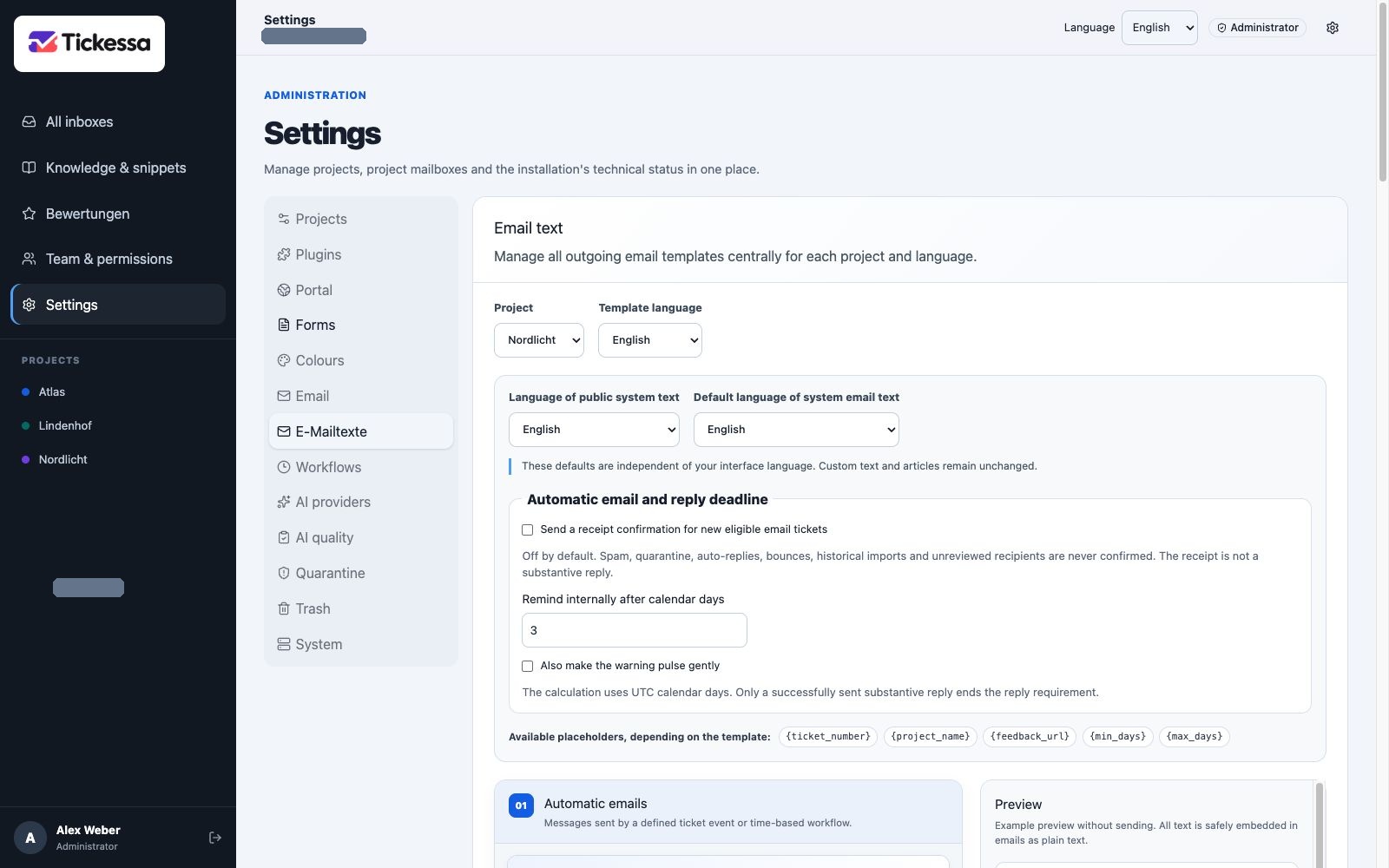
Select the project and content language before editing signatures or system text.
Edit email text
Only administrators can open Settings → Email text per language.
- Select the project.
- Select Deutsch or English under Template language, independently of your interface language.
- Edit that language's text.
- Review the preview on the right, or below on narrow screens.
- Select Save this language.
Fields include optional receipt-confirmation subject/body, signature, human/reviewed-AI/automatic-AI origin notices, personal-review heading/description/link label and public AI information title/body.
Under Automatic email and reply deadline, explicitly enable receipt confirmations for the selected project. The switch is off by default. Tickessa sends exactly one confirmation for a new eligible email ticket. Spam, quarantine, bounces, auto-replies, historical imports, support addresses and unreviewed recipients are excluded. A receipt is not a substantive reply and does not enable AI.
The same section sets the number of UTC calendar days before Tickessa displays an internal unanswered-request warning. The warning can optionally pulse gently while remaining labelled with text and an icon; reduced-motion preferences are respected.
Placeholders and preview
Only receipt subject/body accept {ticket_number} and {project_name}. Other placeholders are rejected. Preview substitutes an example ticket number and the project name without sending a test email.
All fields are plain text; HTML is safely displayed as text. Short fields allow 180 characters and no line breaks, origin notices 1,000 characters, and longer text 8,000. Signatures may be empty. AI notices must explain AI involvement, possible errors and actual review status; misleading accuracy promises are rejected.

The preview shows how the signature and response-origin notice appear together in an email.
Versions, drafts and reset
Each successful save creates a new version of the selected language while preserving others. Switching template language retains unsaved drafts in the open editor. Changing project with unsaved changes requires confirmation.
Restore defaults for this language requires confirmation and saves defaults only for the selected language. Saving or resetting never changes older messages or their origin records.
If someone has changed the configuration meanwhile, Tickessa rejects a stale save. Keep your draft, reload the current version and reconcile changes before saving again.
Existing installations and future languages
Migration 030 preserves existing German signatures and transparency text verbatim. Existing accounts/projects default to German. English receives independent defaults.
Future languages use the shared registration and separate translation files. Only reviewed language packs become selectable. The handbook has its own selector and an English edition under /en/.
If a customised receipt template is unavailable in the ticket language, Tickessa uses a customised project-default language and then the German system default. The ticket timeline records the selected language and template version.