Controlled automatic sending
Tickessa 0.11.0 technically supports automatic AI replies for individually approved, low-risk routine email cases. Human approval of drafts remains the normal recommended mode.
The feature is technically published but inactive. AI_ENABLED=false and AI_AUTOMATIC_SEND=false independently prevent automatic AI calls and emails. Enabling requires separate explicit approval.
Eligible cases
V1 considers only a new accepted email without attachments. An active rule must match the project and exact classified category. It specifies the project, category, readable routine-case name, active category reply profile, classification confidence of at least 95% and minimum approved source count.
Quality, safety, cost and fallback must each be confirmed before activation.
Always excluded
Legal/contract/liability/cancellation matters; payments, invoices, refunds and financial decisions; privacy/access/deletion/consent requests; complaints and escalation; security incidents, credentials, phishing and abuse; requests for a person or callback; attachments, missing information, uncertain categories and conflicting knowledge all go to a person.
Quarantine, spam, web forms, existing conversations and reopened tickets are also excluded.
Independent gates
All must pass:
- General AI runtime enabled.
- Separate server auto-send switch enabled.
- Installation approval.
- Global emergency stop off.
- Project emergency stop off.
- Still-valid evaluation for this project.
- Active rule with all four confirmations.
- Matching category profile.
- Enabled tasks and available budgets.
- Enough valid, consistent knowledge.
A stored provider connection or cleared stop alone never suffices.
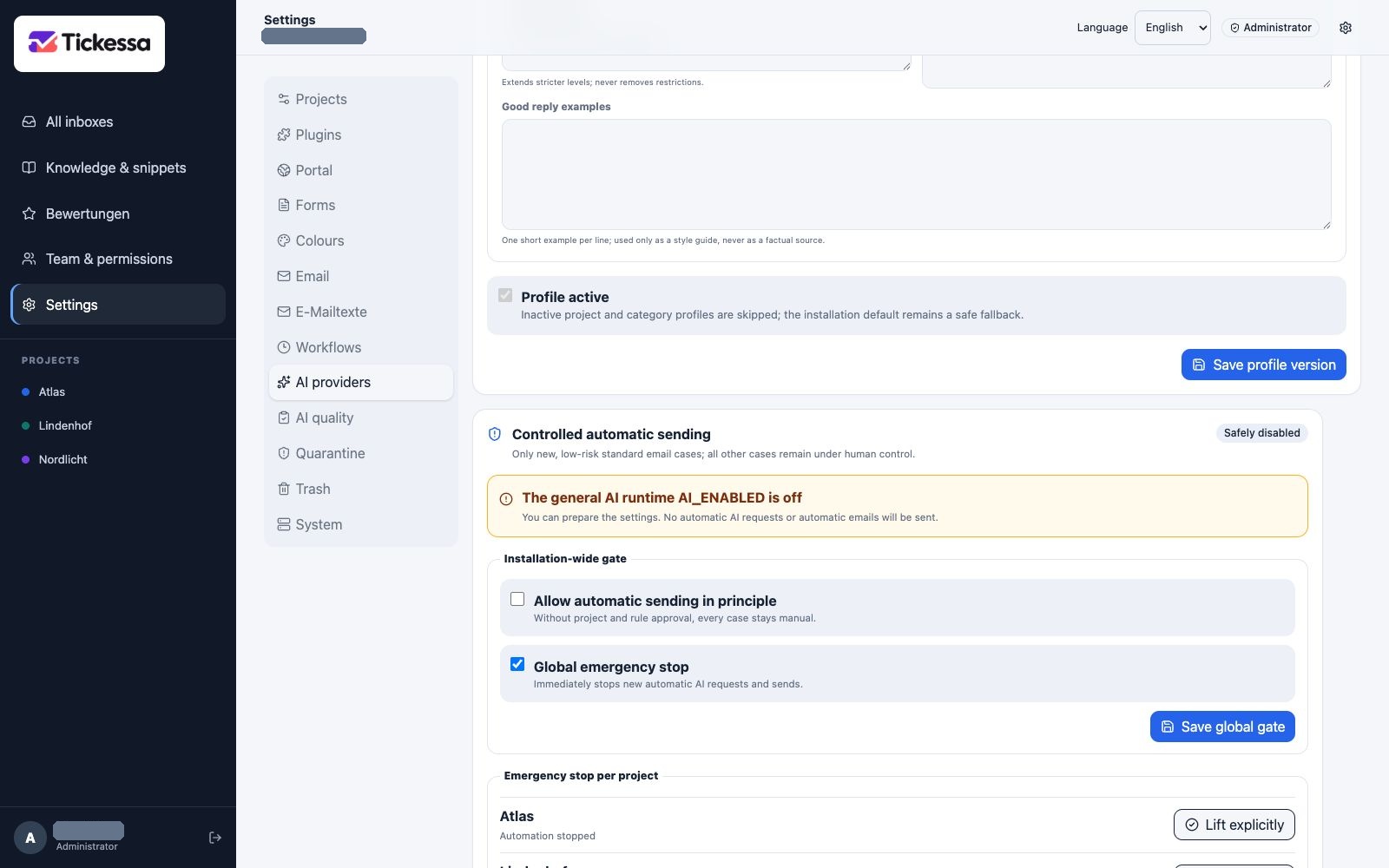
This view shows the separate approvals and limits for automatic sending. It remains disabled in the example.
Configure a rule
Open Settings → AI providers → Controlled automatic sending. Choose a project and category reply profile; its category is binding. Name the narrow case, set 95–100% confidence and the required number of published sources that must be cited. Review quality, safety, cost and fallback individually, then activate and save.
Changing project, profile, category, threshold or source count requires fresh confirmations. Profile version and configuration boundary stay visible.
Why sources are mandatory
Factual claims must derive from approved knowledge in the same project. Sources must be published, reviewed, current, product-version appropriate and conflict-free. The server validates cited IDs. Unknown sources, too few citations or contradictory articles stop sending; plausible wording cannot replace missing product knowledge.
Emergency stops
The auto-send area has global and project stops. Stop immediately blocks new AI calls and automatic sends before the next step. Explicitly clear stop opens only that gate. The external server switch is visible but cannot be changed in the browser, preserving the final operational boundary.
At most one automatic reply
Tickessa uniquely reserves each new case before its first AI call. Each case receives at most one automatic evaluation and one automatic reply, with no automatic retry after provider or SMTP failure.
A customer reply or personal-review link changes the ticket to Personal review requested and permanently blocks auto-send for that thread.
Transparency and evidence
Automatic messages clearly state AI involvement and lack of individual review and include a personal-review link. Internally, Tickessa retains rule/configuration hashes, category/confidence, AI runs/provider/model/prompt version, reply profile/source versions and stop reason or outgoing message.
The decision list excludes email, prompt, article and reply texts, avoiding unnecessary content copies.
Typical stops
| Display | Meaning | Next step |
|---|---|---|
| Handed to a person | Content or safety gate | Review normally |
| Technically stopped | Provider, budget, schema or SMTP uncertainty | Investigate; do not automatically resend |
| Evaluation approval changed | Dataset or AI configuration differs | Run a new evaluation |
| Missing/conflicting knowledge | Insufficient safe basis | Review and approve versioned articles |
| Emergency stop active | Global or project block | Investigate before deliberately clearing |
See Personal review and AI evaluation.