Privacy-conscious self-help statistics
Tickessa can show where public self-help works and where content needs review. Statistics are optional, disabled after installation and update, and independent of FAQ and contact forms.
This feature sets no cookie, loads no tracking provider and stores neither IP addresses nor user agents. A random identifier exists only in the current browser tab. The server keeps a project-bound hash for a limited raw-data period. Projects and domains are never combined into a visitor profile.
What is counted
- Searches, including searches with no results.
- Up to ten articles suggested in a search.
- Opening a published article version.
- Voluntary Helpful or Not helpful feedback without comments.
- Public form-topic selections.
- Contact-form openings and successful ticket creation.
- Contact after an article view or public AI help in the same tab within two hours.
- Answered or safely declined public AI requests, excluding questions and answers.
Recognised bots, crawlers, monitoring, previews and test requests are excluded. A statistics failure cannot prevent reading articles or submitting a form.
What is not stored
Statistics contain no email, name, message, ticket number, AI question or AI answer. The original browser identifier is also excluded from the database.
Search terms are limited to 120 characters. Detected emails, URLs, phone numbers or ticket identifiers suppress the readable search text; only a count under an irreversible installation-bound key remains. Still tell visitors to avoid personal or confidential information in searches.
Activation order
Open Settings → Portal, choose the project and:
- Enable its help homepage and knowledge section.
- Add and check the project privacy link.
- Write a readable public statistics notice under Privacy-conscious self-help statistics.
- Set raw retention to 1–90 days; default 30.
- Set aggregated daily retention to 30–730 days; default 365.
- Explicitly confirm Statistics privacy review.
- Enable Self-help statistics for this project and save.
- Set
PUBLIC_ANALYTICS_ENABLED=trueon the server last.
Changing the privacy link resets approval. If the global switch stays off, the interface indicates this and collects nothing despite project approval.
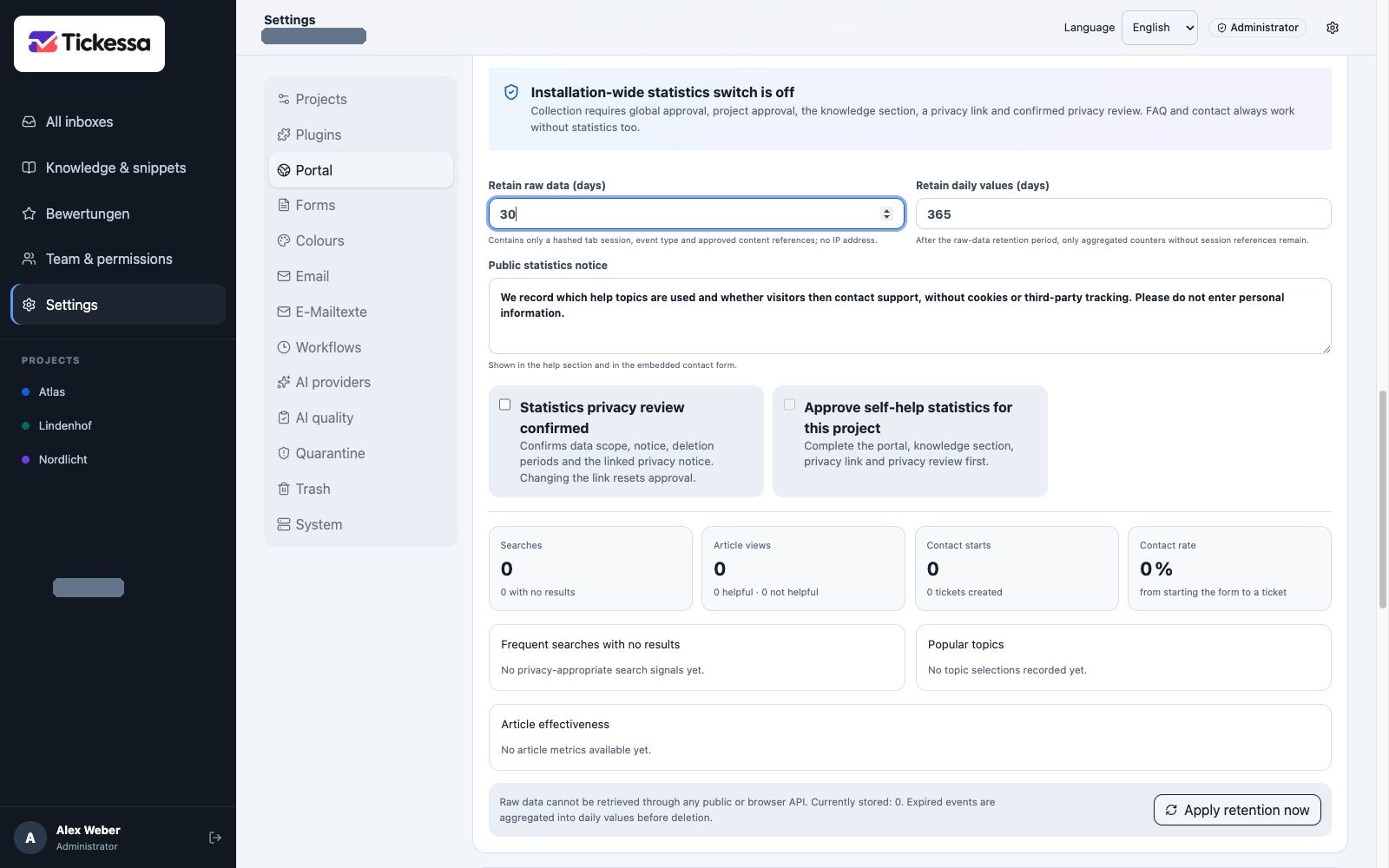
This view combines retention, approvals and metrics. Collection is disabled in the example.
Understand the overview
Searches and no-result searches
Searches counts executed searches. No results counts searches without matching published articles. Frequent searches without results shows only text that passed the protection rules. Missing rows do not necessarily mean zero unsuccessful searches.
Frequent topics
This counts selected public form topics for navigation and content planning. Repeated identical selections in the same tab are not counted again.
Article effectiveness
For each published article version, the overview shows views, search suggestions, helpful/unhelpful votes and subsequent contacts. The contact rate divides subsequent contacts by the larger of views and search suggestions.
A subsequent contact is only a temporal association within the same project and tab. It does not prove that an article caused contact or was poor. Small samples and repeated views can noticeably influence results.
Overall contact rate
This divides successfully created tickets by loaded contact forms. It describes the form process, not unique visitors: someone may intentionally open a form without submitting it.
Apply retention now
Protected cron applies retention automatically. Administrators can run the same operation with Apply retention now. In one transaction, expired raw events are aggregated into project daily counters and then deleted. Daily values have no session reference and expire on their own schedule.
The interface exposes only the count, age and next expiry of raw events. Individual events and session hashes are unavailable publicly and through browser administration.
Internal AI revision suggestion
An article is flagged when at least one condition holds:
- Three Not helpful votes.
- Two subsequent contacts.
- At least five views and a contact rate of at least 40%.
Suggest internal AI draft requires additional confirmation before a paid AI call. Only the published article and four aggregate counts—views, helpful, unhelpful and contacts—are submitted. Search terms, sessions, tickets and contact data are excluded.
The result is an internal knowledge candidate and never replaces or publishes an article automatically. Review facts, language, uncertainty and sources before adopting a new working version. Expert approval and explicit publication remain separate.
Disabled AI, missing budget or provider errors leave the article unchanged. Ordinary statistics and support remain available.
Disable and troubleshoot
Remove project approval to stop one project, or set PUBLIC_ANALYTICS_ENABLED=false to stop collection across the installation. Existing values remain until retention deletes them; Apply retention now deletes only expired data.
Disabling statistics does not change articles, forms or tickets. Check the project, privacy approval, retention and cron without exporting raw data or unnecessarily extending retention.