Prepare real AI quality cases
Under Settings → AI quality, administrators derive separate quality cases from suitable resolved tickets for reproducible classification, priority and reply evaluation.
This is neither a sending tool nor an AI run. It copies selected material into a cleaned test record requiring explicit human approval. Original tickets, messages and contacts remain unchanged.
Evaluation can start with at least two actual, authorised, anonymised cases from one project already providing real support. Unreleased projects cannot supply real cases and do not permanently block the start. Their labelled synthetic cases test technical channels only, count as no real cases and grant no production AI approval.
Eligible tickets
Tickets must be resolved or closed, come from email or web, have at least one incoming message, not be deleted and not already belong to a quality case.
An existing sent reply becomes the initial reference answer. If absent, add a technically correct reference answer to the draft. Nothing is sent retrospectively.
Step 1: Document permission
Select the case and describe who authorised editorial use for which internal quality purpose under Documented basis for use. This is an internal audit record; do not add names, addresses or case details.
Confirm separately that this was an Actual support case from an approved channel and that Editorial use is authorised. Create anonymised draft creates a working copy and replaces known contacts and typical personal identifiers. Automatic cleaning is only preflight, never final privacy approval.
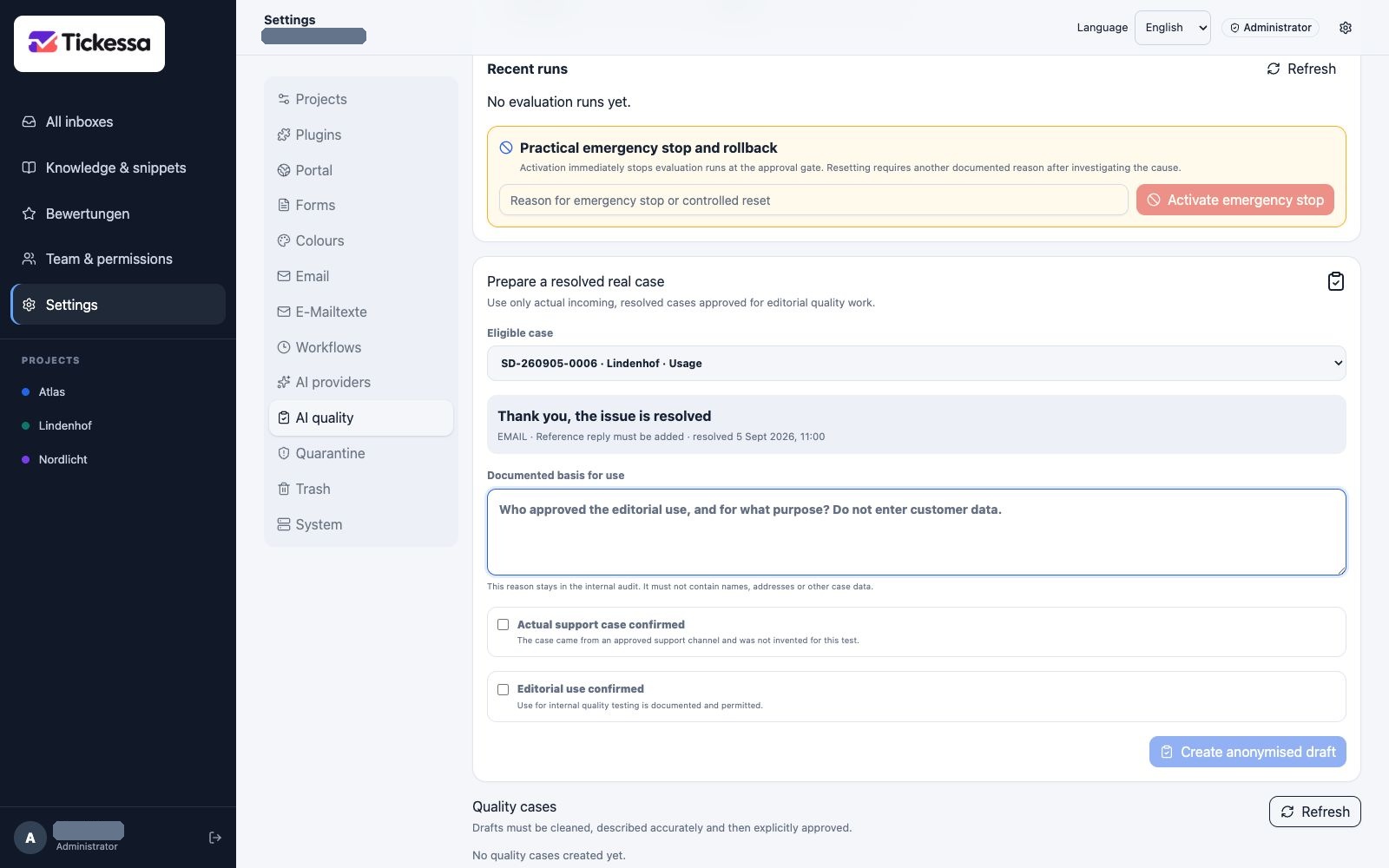
Before preparing a case, record the permission basis and source ticket. The screenshot shows preparation only.
Step 2: Review cleaned content
Read the anonymised subject without identifying details, the customer's situation containing only necessary technical facts, and the technically correct reference answer. Remove confidential and project-sensitive details beyond obvious contact information. Generalise unnecessary details so the record captures the decision rather than a person's identity. The reference is an evaluation standard and is never sent to the original contact.
Step 3: Define expected results
Set the expected category and priority, then the response boundary: a sourced answer, questions first, or personal handling only. List required answer points and forbidden statements one per line. At least one of each is mandatory, allowing evaluation of completeness and safety rather than wording similarity alone.
Step 4: Mark risks
- Spam: rejected intake must stay out of AI processing.
- Wrong recipient: message belongs to another recipient or project.
- Ambiguous: questions are required instead of assumptions.
- Complaint: careful personal handling is needed.
- Sensitive content: data or topics require human oversight.
- Manipulation attempt: customer text tries to bypass safety or system rules.
Multiple flags are possible and do not replace category or response boundary.
Step 5: Save and reread
Save draft reruns technical detection and stores expectations. Every content change resets approval confirmations. Unsaved changes disable Approve quality case. Read the exact saved version: its content hash does not refer to an unsaved draft.
Step 6: Approve or reject
Explicitly confirm all three:
- Personal and confidential details are completely removed.
- Content and expected answer have been checked by a competent reviewer.
- The operation triggers no customer communication.
The server checks the saved text again, including known values from the original ticket. Remaining identifiers or missing expectations block approval. Approved records are locked in the interface and show a content hash. Reject records rejection without changing the original ticket.

Project readiness shows where reviewed cases and further evidence are missing.
Project readiness
The overview counts approved cases per project. The initial gate is ready when at least one live project has two approved real cases. This minimum does not establish representative coverage of all categories and risks.
Only projects named as ready may participate in the first real-case evaluation. A project without its own real cases remains excluded from production AI approval even if intake/reply tests pass. Once launched, it needs at least two appropriate, anonymised and approved real cases before its own AI approval.
Compare synthetic assumptions with real cases
Approving a case does not approve an article or snippet. Review every prior synthetic-content claim separately:
- Confirmed: the real case supports the same action and safety boundaries.
- Extended: it supports the approach but adds questions, escalation limits or forbidden claims.
- Corrected: the assumption is invalid and must change before AI evaluation.
- Not suitable as reply content: especially spam or wrong-recipient cases where no response should be sent.
Comparison stays project-specific. A case cannot validate another project's knowledge. Public publication is a separate editorial decision. A negative case may be useful solely for classification and the no-reply boundary.
Security and privacy
Only administrators access or edit quality cases. Drafting, editing, approval and rejection call no provider and have no sending path. Approved datasets contain no contact objects, raw emails, ticket numbers or attachments. Provenance, actor, approval time and decisions are audited without another content copy. Project boundaries remain enforced.
The protected /api/v1/ai/quality-dataset endpoint exports only approved versions for evaluation. Export itself calls no model and sends no message.
Next: evaluation
Once Ready for #27 appears, start a free local preflight. Only a subsequently confirmed shadow run transfers anonymised evaluation data to the configured provider. Review every result against its predefined expectation. See Evaluate and approve AI safely.