Tickessa 0.15.17
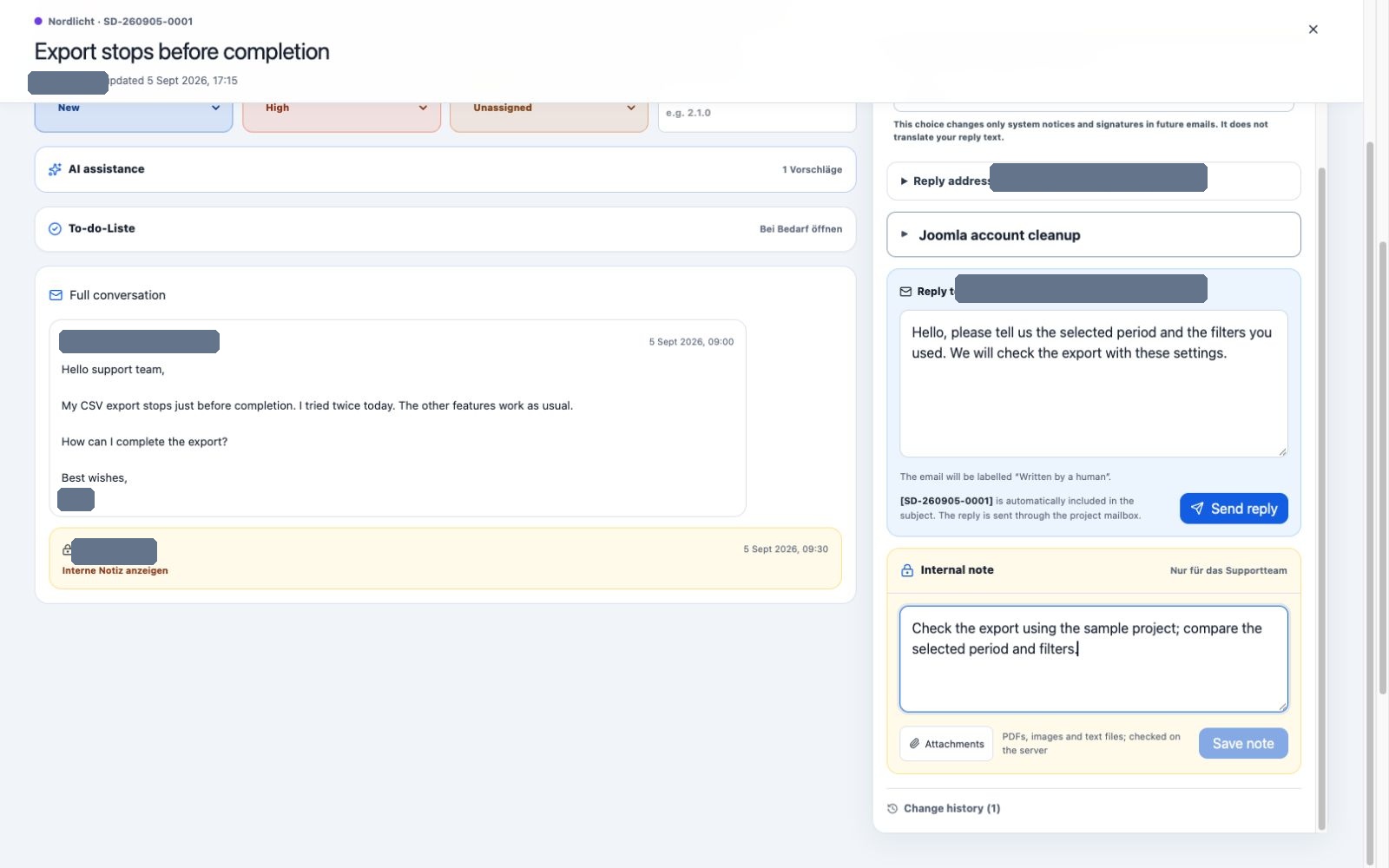
Customer replies and internal notes use separate editors. Reply language controls the signature and system notices.
Tickessa 0.15.17 completes the controlled Joomla account-cleanup workflow. The ticket system manages the connection and project, locates the verified Joomla account, displays the preview and continues the same signed operation through restoration or permanent finalisation. The Joomla website performs approved steps locally.
Use Tickessa 0.15.17 together with Joomla account cleanup 0.6.2 for the workflow documented here. Earlier combinations do not include every safety and recovery feature in this guide.
New since 0.15.4
- 0.15.4: Assign Joomla connections to a Tickessa project and test them separately.
- 0.15.5–0.15.7: A privacy-conscious search by username, name or email address replaces manual user IDs; administrator accounts remain excluded.
- 0.15.8–0.15.10: Cleanup, customer reply and ticket status are visibly separate. The result button distinguishes Deleted from Anonymized.
- 0.15.11: Approved Joomla processing runs in bounded steps and resumes interrupted work with the same operation identifier.
- 0.15.12–0.15.14: Joomla creates an encrypted restore point before changing data. After processing, the agent can restore the original state or deliberately finalise the cleanup.
- 0.15.15: The browser sequence shows progress and stops after a fixed step or time limit with a clear resume action.
- 0.15.16: Internal links can open an authorised ticket directly after sign-in. Existing role and project checks still decide access.
- 0.15.17: Opening an existing operation synchronises its status once automatically. This request neither starts cleanup nor finalises it.
Important boundaries
- An incoming message, connection test or customer reply never starts account cleanup.
- Identity verification, a regular hosting backup and review of other data stores remain mandatory.
- Automatic status synchronisation is read-only. Deletion, restoration and permanent finalisation remain explicit actions.
- The technical audit is stored as an internal note. The customer draft remains editable and is sent only with Send reply.
- Ticket status and customer email never change automatically.
See Joomla account cleanup for the complete workflow. Customer account and downloads explains installation and entitlements.
Verified release
Browser checks cover German and English plugin settings, the confirmed project connection and a synthetic completed state with an internal note, disabled result button and separate customer draft. Automated tests cover status synchronisation, recovery, error boundaries, permissions and packaging. Documentation checks send no email, invoke no AI and modify no real Joomla account.