Replies and internal notes
Send a customer reply
- Open the ticket.
- Check the recipient and project mailbox.
- Write your reply.
- Check the indicated origin: Written by a person, or AI with human approval after adopting an AI draft.
- Select Send reply.
Tickessa sends through the assigned project's mailbox. The ticket number and standard email headers associate subsequent customer replies with the conversation.
Every sent reply receives an immutable origin record and a readable notice in both the plain-text and HTML email. See Response origin and AI transparency.
The ticket's Reply language selects the language of system notices and the signature. The project default applies unless overridden. It does not translate the reply you wrote. Administrators edit these texts under Languages and email templates.
A customer reply leaves the system as an email. Check the recipient, content and project before sending.
Change the reply address for forwarded mail
The email reply editor displays the actual Reply address, the original contact and any valid Reply-To address recorded from the first message.
- Review who should receive the reply.
- Enter an address or select an unverified suggestion from the forwarded message.
- Review the reply content, confirm the recipient check and save the address.
- Send your reply after the editor has been unlocked.
Recognised forwards and ambiguous addresses block manual and automatic email until confirmed. Quoted headers and attached EML messages are suggestions only. Detection cannot identify every freely worded forward; always check the displayed recipient.
A confirmed ticket address takes precedence over a single valid Reply-To, which takes precedence over the original contact. Later incoming messages do not replace your choice. Only this ticket changes; contacts and historical messages are preserved. The history records who changed the address and its previous/new values. Internal notes and the previous conversation are not automatically included. Review adopted AI drafts for internal information as well.
Concurrent address changes block sending with a stale recipient. Reload the ticket and review the current address. Extension-owned reply channels retain their own delivery path and do not use this email editor.
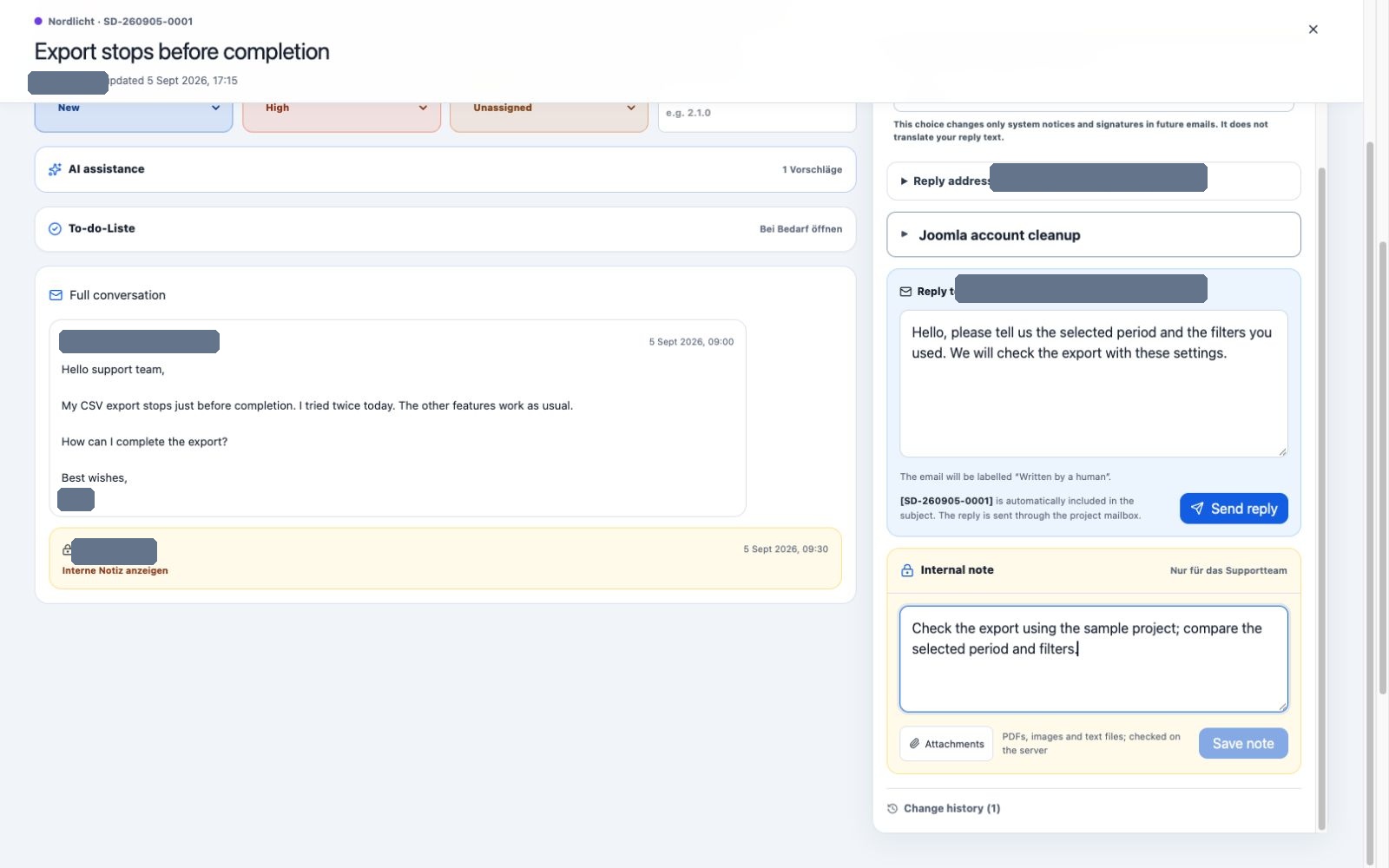
Customer replies and internal notes use separate editors. Reply language controls the signature and system notices.
Adopt an AI draft
Use in reply copies a reviewed suggestion into the editor. Read and edit the complete text. Only the normal send button sends it. Automatic sending has not been approved on the reference installation.
See AI assistance in tickets for details.
Handle a personal review request
If a recipient requests personal review of an automatic reply, the ticket appears in Personal review with a visible marker. A notice explains whether the request came through the confirmation link or a normal email reply.
Read the original automatic reply and the entire conversation. Write the next response yourself, or fully review an AI draft and send it manually. Only a successful send fulfils the request. Automatic sending remains permanently blocked for this conversation afterwards.
Link protection, expiry, revocation and errors are covered in Personal review of automatic replies.
Add an internal note
Internal notes are visible only to authorised Tickessa users and are not sent as customer emails. Use them for handovers, review results and internal questions.
Keep sensitive credentials in the designated protected systems. Passwords, API keys and server access details do not belong in tickets or notes.
“No reply for X days” warning
This labelled red warning means that the oldest unanswered customer message has reached the deadline configured for its project. Select the Unanswered metric to open that queue within your project permissions.
Only a successfully sent substantive support reply ends the current reply requirement. Reading, assignment, internal notes, AI drafts, automatic receipt confirmations and failed delivery attempts do not. After a successful reply, a later customer message starts a new deadline cycle.
Attachments
The server validates attachments and provides them only to authorised users. Treat unexpected files with the same care as ordinary email attachments.