Public AI help from approved knowledge
Public AI answers visitor questions only from published, expert-approved articles in the current project. It never searches tickets, internal notes or other projects. Without a reliable basis, it asks at most a clarifying question or offers the contact form.
This feature processes content at the configured AI provider and may incur costs. It stays disabled after installation and update. Activate it only after subject-matter, legal and privacy review.
What visitors see
Try AI help appears only after all approvals. Before input, visitors see that answers are automatic and not personally reviewed, a warning to avoid personal or confidential data, an explanation that no server chat history is stored, and an always-available personal-support route.
Every factual answer links its public source articles. Tickessa returns no factual answer without those links.
Prepare the knowledge article
Open Knowledge and check the published version, which may differ from the latest draft:
- Project must match the portal exactly.
- Audience must be Public; Internal is technically excluded.
- Public title should clearly describe the question for local retrieval.
- Publicly usable content must explicitly state reviewed steps, prerequisites, order, limits and expected results.
- Internal notes stay team-only and cannot replace needed public information.
- Category and topic assist search and contact-topic suggestions but grant no access.
- Product versions must not make obsolete instructions appear current.
- Valid from/until excludes versions outside their valid period.
- Review date prevents overdue content from being used as an AI source.
- Sources and internal references support team review and are not public or additional model sources.
- Approve reviews only the current version.
- Publish is a second explicit action before that version enters FAQ and AI retrieval.
Later editing creates a new unreviewed draft while the published version remains online. See the article field guide.
Project settings
Open Settings → Portal → Public AI help.
- Technical policy ready reports provider, model, task and budget readiness; it enables nothing automatically.
- Minimum answer confidence ranges from 0.50 to 0.99. A higher threshold is more cautious but may route more visitors to contact.
- Maximum question length uses the stricter project or installation limit.
- Requests per 15 minutes limits the project, alongside a pseudonymous client limit and installation total.
- Legal approval confirms presentation, disclaimers, legal notice and intended use. Changing the legal-notice URL resets it.
- Privacy approval covers data flow, provider, storage and notice. Changing the privacy URL resets it.
- Enable public AI help for this project requires portal, FAQ, contact, legal links, both approvals and technical readiness. It can always be disabled.
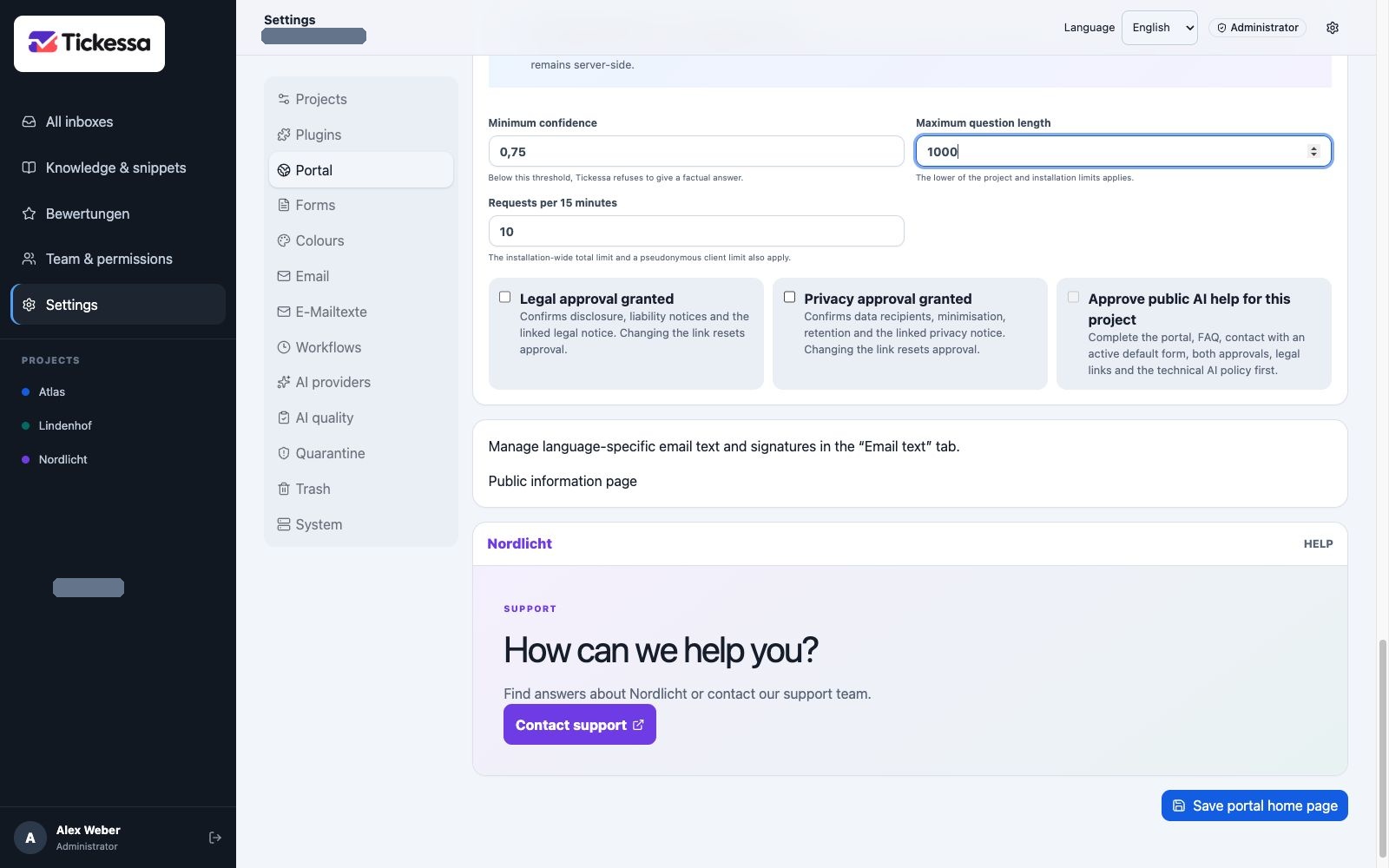
Technical limits and project approvals must be complete. This example shows the disabled state.
Configure public_help
Under Settings → AI providers, use an active separately tested provider and an available model, with Fallback off, Retries 0, a 5–60 second timeout, a sufficient but limited input size, realistic estimated cost, small positive daily/monthly task budgets, and positive project/installation budgets without an emergency stop.
This policy permits a call; it neither publishes knowledge nor enables the portal or sends messages.
Activation order
- Review and publish suitable public articles.
- Test FAQ search and article pages without AI.
- Check contact, topic, privacy and a controlled test ticket.
- Test provider credentials and model separately.
- Configure
public_helpand task, project and installation budgets. - Add legal and privacy links.
- Set legal and privacy approvals.
- Enable project AI.
- Set
AI_ENABLED=trueandPUBLIC_AI_ENABLED=truein protected server configuration last. - Test known, unknown, sensitive and manipulative questions and monitor cost.
Check answers and safe refusals
Known questions must receive correct answers with every source linked. Unknown questions must lead to contact without invented solutions. Questions containing emails or phone numbers must be rejected locally. Legal, financial, health or security matters must go to personal support. Attempts to ignore rules or expose prompts must reveal nothing internal. FAQ, search and contact must continue when providers, budgets or AI are disabled.
Handover to contact
The visitor explicitly chooses to copy the question and result. The browser keeps them in sessionStorage for at most 30 minutes; the URL contains only a random key and possibly a public topic.
The form explains that nothing has been sent. Subject and message remain editable. Only Send enquiry creates a ticket, then deletes the local handover. Without confirmation, after expiry or in another browser session, the form stays empty.
Stop quickly
Use the AI emergency stop, PUBLIC_AI_ENABLED=false, or disable project AI. Public knowledge and contact remain independent. Correct articles through normal version review and publication; do not overwrite evidence while troubleshooting.